Your cart is currently empty!

Building Real-time Voice Conversations with ElevenLabs WebSocket API: A Complete Development Guide

BY
Recently, I’ve been researching real-time voice conversation implementations and discovered that ElevenLabs Agents Platform provides a very powerful WebSocket API. After some exploration, I completed a real-time voice conversation demo that can run directly in the browser. Today, I’ll share the implementation details and usage experience of this project.
1. Why Choose ElevenLabs?
Before we begin, you might be wondering why I chose ElevenLabs over other solutions. I compared ElevenLabs with OpenAI Realtime API and found that ElevenLabs has unique advantages in voice selection, model flexibility, and other aspects. However, I’ll elaborate on this comparison in detail later in the article.
2. Project Overview
demo link: https://demo.navtalk.ai/11labs/en/index.html
This demo is implemented based on the ElevenLabs Agents Platform WebSocket API and supports:
✅ Complete WebSocket connection management
✅ Real-time voice input and output
✅ Text message support
✅ Rich custom configuration options
✅ Complete message handling mechanism
The entire project can run directly in the browser without a backend server, making it perfect for rapid prototyping and learning.
3. Core Features
3.1 Complete WebSocket Connection
The project implements complete WebSocket connection management, including:
▪️ Automatic signature URL retrieval
▪️ Secure WSS connection establishment
▪️ Comprehensive connection status and error handling
3.2 Real-time Voice Conversation
Voice processing is the core functionality, including:
▪️ Microphone audio capture
▪️ 16kHz PCM audio encoding
▪️ Real-time audio stream transmission
▪️ Agent audio playback
3.3 Complete Message Handling
Supports all message types provided by ElevenLabs:
▪️ `conversation_initiation_metadata` – Session initialization
▪️ `user_transcript` – User speech-to-text
▪️ `agent_response` – Agent text response
▪️ `agent_response_correction` – Agent response correction
▪️ `audio` – Agent audio response
▪️ `interruption` – Interruption detection
▪️ `ping/pong` – Heartbeat detection
▪️ `client_tool_call` – Tool call support
▪️ `contextual_update` – Context update
▪️ `vad_score` – Voice activity detection score
3.4 Text Message Support
In addition to voice input, it also supports sending text messages to the Agent, with a very practical feature: text messages can interrupt the Agent’s ongoing voice response, making conversations more natural.
3.5 Custom Configuration
Provides rich configuration options:
▪️ Custom Agent Prompt
▪️ Custom first message
▪️ Language override
▪️ TTS voice ID override
▪️ Dynamic variable support
▪️ Custom LLM parameters (temperature / max_tokens)
4. Detailed Usage Instructions
4.1 Prepare Configuration
4.1.1 Open File
Simply open the link https://demo.navtalk.ai/11labs/en/index.html in your browser to get started.
4.1.2 Required Configuration Items
API Key (xi-api-key):
▪️ ElevenLabs API Key
▪️ Format: `sk-…` or `xi-api-key`
▪️ How to obtain: Log in to the ElevenLabs Console(https://elevenlabs.io/app/settings/api-keys), create or view API Key
Agent ID:
▪️ ElevenLabs Agent ID
▪️ Format: `agent_…`
▪️ How to obtain: Create or view an Agent on the ElevenLabs Agents page(https://elevenlabs.io/app/agents), then copy the Agent ID
4.1.3 Optional Configuration Items (in interface order)
Custom Prompt:
▪️ Override the Agent’s default prompt
▪️ Leave empty to use the default prompt from Agent configuration
▪️ Can be used to temporarily modify the Agent’s behavior and conversation style
First Message:
▪️ The first sentence the Agent says after connection
▪️ Leave empty to use the default first message from Agent configuration
▪️ Example: “Hello, I’m your AI assistant. How can I help you?”
Language:
▪️ Override the Agent’s default language setting
▪️ Supported language codes: `en` (English), `zh` (Chinese), `es` (Spanish), `fr` (French), `de` (German), `ja` (Japanese), etc.
▪️ Leave empty to use the default language from Agent configuration
TTS Voice:
▪️ Override the Agent’s default voice setting
▪️ Select different voice IDs from the dropdown menu
▪️ Leave empty to use the default voice from Agent configuration
▪️ Note: You need to fill in the API Key first to load the voice list
Dynamic Variables:
▪️ Used to dynamically replace variable placeholders in the Prompt during conversation
▪️ Format: JSON object, for example `{“user_name”: “John”, “greeting”: “Hello”}`
▪️ Use case: When the Agent’s Prompt contains variables (such as `{{user_name}}`, `{{greeting}}`), you can pass actual values through dynamic variables
▪️ Example:
{
“user_name”: “John”,
“company”: “ABC Company”,
“product”: “Smart Assistant”
}
▪️ If the Agent’s Prompt contains `Hello, {{user_name}}, welcome to use {{product}}`, the dynamic variables will automatically replace it with `Hello, John, welcome to use Smart Assistant`
▪️ Leave empty to not use dynamic variables
LLM Temperature:
▪️ Controls the randomness and creativity of LLM text generation
▪️ Value range: 0.0 – 2.0
▪️ Lower values produce more deterministic and consistent output (more conservative); higher values produce more random and creative output (more flexible)
▪️ Recommended value: 0.7 – 1.0 (balanced creativity and consistency)
▪️ Leave empty to use the default value from Agent configuration
LLM Max Tokens:
▪️ Limits the maximum number of tokens for a single LLM response
▪️ Value range: Positive integers
▪️ Used to control response length and avoid overly long replies
▪️ Leave empty to use the default value from Agent configuration
4.2 Start Conversation
1. Click the “Connect and Start Conversation” button
2. The browser will request microphone permission, please allow it
3. Recording will start automatically after successful connection
4. Start speaking, and the Agent will respond in real-time
4.3 Function Operations
▪️ Stop Recording: Stop sending audio but keep the connection
▪️ Disconnect: Completely disconnect the WebSocket connection
▪️ Text Message: Enter a message in the text input box and send it
5. API Documentation Reference
The demo implementation is based on ElevenLabs Agents Platform WebSocket API(https://elevenlabs.io/docs/agents-platform/api-reference/agents-platform/websocket)
5.1 WebSocket Endpoint
wss://api.elevenlabs.io/v1/convai/conversation?agent_id={agent_id}
5.2 Complete Call Flow
5.2.1 Connection Establishment Phase
Step 1: Establish WebSocket Connection
Client → Server: Establish WebSocket connection
wss://api.elevenlabs.io/v1/convai/conversation?agent_id={agent_id}
Step 2: Send Initialization Data
▪️ Immediately after successful connection, send `conversation_initiation_client_data` message
▪️ Contains Agent configuration overrides (optional), dynamic variables (optional), custom LLM parameters (optional)
▪️ Wait for server to return `conversation_initiation_metadata` event
Step 3: Receive Session Metadata
▪️ Server returns `conversation_initiation_metadata` event
▪️ Content to handle:
– Save `conversation_id` (for subsequent session management)
– Record audio format information (`agent_output_audio_format`, `user_input_audio_format`)
– Start audio capture (call `getUserMedia` to get microphone permission)
5.2.2 Conversation Phase
Audio Input Flow:
User speaks → Microphone capture → Audio processing (downsample to 16kHz) → Convert to 16-bit PCM → Base64 encode → Send user_audio_chunk
Server Response Flow:
Server receives audio → Speech recognition (ASR) → Send user_transcript → LLM processing → Generate response → Send agent_response → TTS synthesis → Send audio chunks
Key Event Handling Sequence:
1. When user speaks:
▪️ Continuously send `user_audio_chunk` (send once every 4096 samples)
▪️ Server processes audio stream, may return `vad_score` (voice activity detection score)
2. Server recognizes user speech:
▪️ Receive `user_transcript` event
▪️ Can display what the user said in the UI (for debugging)
3. Server generates response:
▪️ Receive `agent_response` event
▪️ Can display the Agent’s text response in the UI
▪️ May receive `agent_response_correction` (if the Agent corrects the response)
4. Server sends audio:
▪️ Receive `audio` event (may occur multiple times, streamed)
▪️ Processing method:
– Decode Base64 audio data
– Add to audio playback queue
– Play audio chunks in order
5. Interruption handling:
▪️ If the user sends a new message while the Agent is speaking, may receive `interruption` event
▪️ Need to immediately stop current audio playback and clear the audio queue
5.2.3 Heartbeat Maintenance Phase
Heartbeat Mechanism:
▪️ Server periodically sends `ping` event
▪️ Need to immediately respond with `pong` message, containing the same `event_id`
▪️ Used to keep connection alive and detect connection status
5.2.4 Tool Call Flow (if enabled)
Tool Call Steps:
1. Server sends `client_tool_call` event
2. Processing flow:
▪️ Parse tool call information (`tool_name`, `parameters`, `tool_call_id`)
▪️ Execute the corresponding tool/function
▪️ Send `client_tool_result` to return results
3. Server continues processing, may send new `agent_response` and `audio`
5.2.5 Context Update Flow (if enabled)
Context Update:
▪️ Client can actively send `contextual_update` to update conversation context
▪️ Server may also send `contextual_update` event
▪️ Handle context updates according to business requirements
5.2.6 Text Message Flow
Send Text Message:
▪️ Client sends `user_message` event
▪️ Feature: Can interrupt the Agent’s ongoing audio response (ElevenLabs unique feature)
▪️ Processing method:
– If the Agent is playing audio, immediately stop playback (receive `interruption` event)
– Wait for server to process text message and return new response
5.2.7 Connection Close Phase
Normal Close:
▪️ Stop sending audio (call `stopRecording`)
▪️ Close WebSocket connection
▪️ Release audio resources (close AudioContext, stop MediaStream)
Exception Handling:
▪️ Listen to WebSocket `error` and `close` events
▪️ Implement reconnection logic (optional)
▪️ Clean up all resources
5.3 Detailed Event Handling
5.3.1 Events Client Needs to Handle
| Event Type | When Received | Required Handling | Optional Operations |
|---|---|---|---|
conversation_initiation_metadata | After connection established | Save conversation_id, start recording | Display session information |
user_transcript | After user speaks | – | Display what user said |
agent_response | After Agent generates response | – | Display Agent text response |
agent_response_correction | When Agent corrects response | – | Display correction information |
audio | After Agent audio synthesis | Decode and play audio | Display playback status |
interruption | When interruption detected | Stop playback, clear queue | Display interruption prompt |
ping | Server heartbeat detection | Immediately send pong | – |
client_tool_call | When Agent needs to call tool | Execute tool and return result | Display tool call information |
vad_score | During voice activity detection | – | Visualize voice activity |
5.3.2 When Client Sends Messages
| Message Type | Send Timing | Frequency |
|---|---|---|
conversation_initiation_client_data | Immediately after connection established | Once |
user_audio_chunk | Continuously during recording | High frequency (approximately every 250ms) |
user_message | When user inputs text | On demand |
user_activity | When need to notify user activity | On demand |
pong | Immediately respond when receive ping | On demand |
client_tool_result | After tool execution completed | On demand |
contextual_update | When need to update context | On demand |
6. Audio Format Requirements
ElevenLabs has clear requirements for audio format:
▪️ Sample Rate: 16kHz
▪️ Channels: Mono
▪️ Encoding: 16-bit PCM
▪️ Format: Base64 encoded binary data
7. Technical Implementation
7.1 Audio Processing Flow
1. Capture: Use `getUserMedia` API to get microphone audio stream
2. Process: Use `AudioContext` and `ScriptProcessorNode` to process audio
3. Downsample: If sample rate is not 16kHz, automatically downsample
4. Encode: Convert Float32 audio data to 16-bit PCM
5. Encode: Base64 encode and send via WebSocket
7.2 Audio Playback Flow
1. Receive: Receive Base64 encoded audio from WebSocket
2. Decode: Base64 decode to binary data
3. Play: Try to play as MP3 first, if fails, play as PCM
8. ElevenLabs vs OpenAI Realtime API Detailed Comparison
During development, I also researched OpenAI Realtime API and found that both platforms have their own characteristics. Below is my detailed comparison:
8.1 Quick Comparison Overview
| Comparison Item | ElevenLabs Agents Platform | OpenAI Realtime API |
|---|---|---|
| Multimodal Support | ❌ Not supported, i.e., does not support camera recognition (image input) | ✅ Supported (GPT-4o) |
| Voice Selection | ✅ 100+ preset voices, supports voice cloning | ⚠️ 10 preset voices |
| LLM Models | ✅ Multi-model support (ElevenLabs, OpenAI, Google, Anthropic) | ✅ GPT-4o, GPT-4o-mini |
| Knowledge Base | ✅ Supported | ✅ Supported (via Assistants API) |
| Function Call | ✅ Supported | ✅ Supported |
| Text Interrupt AI Response | ✅ Supported (sending text message can interrupt AI’s ongoing response) | ❌ Not supported |
| Latency | ✅ Depends on model (163ms-3.87s) | ✅ Low (300-800ms) |
| Pricing | 💰 Per-minute billing (based on model, $0.0033-$0.1956/minute) | 💰 Per-token billing (GPT-4o-mini more economical) |
For detailed comparison information, please see the detailed explanations of each feature point below.
8.2 Detailed Comparison of Key Points
8.3.1 Multimodal Support (Camera Recognition)
| Platform | Support Status | Detailed Information | Reference Links |
|---|---|---|---|
| ElevenLabs Agents Platform | ❌ Currently not supported | Focuses on voice conversation, does not support visual input (camera/image recognition) | ElevenLabs Agents Platform WebSocket API Documentation |
| OpenAI Realtime API | ✅ Supported (via GPT-4o) | Supports visual input, can process images and video frames, supports real-time camera recognition. GPT-4o model natively supports multimodal input | OpenAI Realtime API Documentation OpenAI GPT-4o Vision Capabilities |
Explanation: OpenAI Realtime API is based on GPT-4o model, supports multimodal input, and can process image and video content. ElevenLabs currently focuses on voice conversation scenarios and does not support visual input.
Reference Sources:
▪️ ElevenLabs: Official WebSocket API Documentation – Does not mention visual input support
▪️ OpenAI: Realtime API Official Documentation – Supports GPT-4o multimodal capabilities
8.3.2 Voice Selection Comparison
| Platform | Voice Count | Voice Characteristics | Customization Capability | Reference Links |
|---|---|---|---|---|
| ElevenLabs Agents Platform | ✅ 100+ preset voices | High quality, multilingual, supports emotional expression, voice cloning | Supports custom voice ID, emotion control, tone adjustment, voice cloning | ElevenLabs Voice Library ElevenLabs Voice Cloning |
| OpenAI Realtime API | ⚠️ Limited selection (10 voices) | Mainly relies on TTS API, provides 10 preset voices (alloy, echo, fable, onyx, nova, shimmer…) | Limited voice control capability, does not support voice cloning | OpenAI TTS Documentation OpenAI TTS Voice List |
Detailed Comparison:
ElevenLabs: Provides over 100 preset voices, covering multiple languages, ages, genders, and styles. Supports voice cloning, can create custom voices from a small number of samples. Supports emotion and tone control, can adjust voice expression. High voice quality, suitable for professional applications.
OpenAI: TTS API provides 10 preset voices (alloy, echo, fable, onyx, nova, shimmer…), relatively limited selection. Does not support voice cloning, weak voice control capability.
Reference Sources:
▪️ OpenAI: TTS API Documentation – Lists 10 available voices
▪️ ElevenLabs: Official Voice Library – Shows large number of preset voices
▪️ ElevenLabs: Voice Cloning Documentation – Supports custom voice cloning
8.2.3 Supported LLM Models
| Platform | Supported Models | Model Characteristics | Reference Links |
|---|---|---|---|
| ElevenLabs Agents Platform | ✅ Multi-model support | Supports ElevenLabs proprietary models and multiple third-party models (OpenAI, Google, Anthropic, etc.), users can choose according to needs, supports custom LLM parameters | ElevenLabs Agents Documentation ElevenLabs LLM Configuration |
| OpenAI Realtime API | ✅ GPT-4o, GPT-4o-mini | Supports GPT-4o (multimodal, stronger capabilities) and GPT-4o-mini (lightweight, faster, lower cost), can switch models | OpenAI Realtime API Models OpenAI Model Comparison |
List of Models Supported by ElevenLabs Agents Platform:
ElevenLabs Proprietary Models:
▪️ GLM-4.5-Air: Suitable for agentic use cases, latency ~631ms, cost ~$0.0600/minute
▪️ Qwen3-30B-A3B: Ultra-low latency, latency ~163ms, cost ~$0.0168/minute
▪️ GPT-OSS-120B: Experimental model (OpenAI open-source model), latency ~314ms, cost ~$0.0126/minute
Other Provider Models (available on ElevenLabs platform):
OpenAI Models:
▪️ GPT-5 series: GPT-5 (latency ~1.14s, cost ~$0.0826/minute), GPT-5.1, GPT-5 Mini (latency ~855ms, cost ~$0.0165/minute), GPT-5 Nano (latency ~788ms, cost ~$0.0033/minute)
▪️ GPT-4.1 series: GPT-4.1 (latency ~803ms, cost ~$0.1298/minute), GPT-4.1 Mini, GPT-4.1 Nano (latency ~478ms, cost ~$0.0065/minute)
▪️ GPT-4o (latency ~771ms, cost ~$0.1623/minute), GPT-4o Mini (latency ~738ms, cost ~$0.0097/minute)
▪️ GPT-4 Turbo (latency ~1.28s, cost ~$0.6461/minute), GPT-3.5 Turbo (latency ~494ms, cost ~$0.0323/minute)
Google Models:
▪️ Gemini 3 Pro Preview (latency ~3.87s, cost ~$0.1310/minute)
▪️ Gemini 2.5 Flash (latency ~752ms, cost ~$0.0097/minute), Gemini 2.5 Flash Lite (latency ~505ms, cost ~$0.0065/minute)
▪️ Gemini 2.0 Flash (latency ~564ms, cost ~$0.0065/minute), Gemini 2.0 Flash Lite (latency ~547ms, cost ~$0.0049/minute)
Anthropic Models:
▪️ Claude Sonnet 4.5 (latency ~1.5s, cost ~$0.1956/minute), Claude Sonnet 4 (latency ~1.31s, cost ~$0.1956/minute)
▪️ Claude Haiku 4.5 (latency ~703ms, cost ~$0.0652/minute)
▪️ Claude 3.7 Sonnet (latency ~1.12s, cost ~$0.1956/minute), Claude 3.5 Sonnet (latency ~1.14s, cost ~$0.1956/minute)
▪️ Claude 3 Haiku (latency ~608ms, cost ~$0.0163/minute)
Custom Models:
▪️ Supports adding custom LLMs
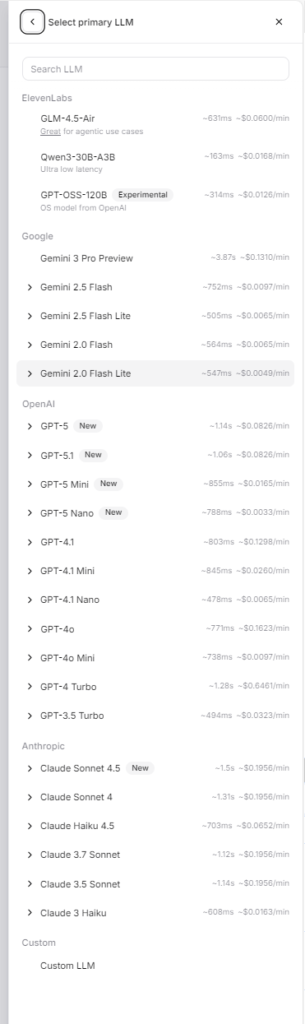
The above image shows the list of selectable LLM models in ElevenLabs Agents Platform, including latency and pricing information
Detailed Explanation:
– ElevenLabs: Provides rich model selection, including proprietary models and models from multiple third-party providers. Users can choose the most suitable model based on latency, cost, and functional requirements. Supports customizing LLM parameters (such as temperature, max_tokens) through `custom_llm_extra_body`.
– OpenAI: Clearly supports GPT-4o (supports multimodal, stronger reasoning capabilities) and GPT-4o-mini (faster, lower cost), users can choose according to needs. Both models support real-time conversation.
Reference Sources:
▪️ ElevenLabs: [Agents Platform Documentation](https://elevenlabs.io/docs/agents-platform) – Model selection interface
▪️ ElevenLabs: [WebSocket API – Custom LLM Parameters](https://elevenlabs.io/docs/agents-platform/api-reference/agents-platform/websocket#custom-llm-extra-body)
▪️ OpenAI: [Realtime API Documentation](https://platform.openai.com/docs/guides/realtime) – Supports GPT-4o and GPT-4o-mini
▪️ OpenAI: [Model Comparison Documentation](https://platform.openai.com/docs/models) – Detailed model information
8.2.4 Knowledge Base Support
| Platform | Knowledge Base Support | Implementation Method | Reference Links |
|---|---|---|---|
| ElevenLabs Agents Platform | ✅ Supported | Supports knowledge base integration through Agent configuration, can upload documents and set up knowledge base, Agent can reference knowledge base content in conversations | ElevenLabs Agents Documentation ElevenLabs Agent Configuration |
| OpenAI Realtime API | ✅ Supported (via Assistants API or Function Calling) | Can integrate knowledge base through Assistants API (file upload, vector storage), or access external data sources and APIs through function calling | OpenAI Assistants API OpenAI Function Calling |
Detailed Explanation:
– ElevenLabs: Supports knowledge base functionality in Agent configuration, can upload documents for Agent reference. Knowledge base content will be automatically referenced in conversations.
– OpenAI: Can create assistants with knowledge base through Assistants API (supports file upload and vector storage), or access external data sources and APIs through function calling, achieving more flexible knowledge retrieval.
Reference Sources:
▪️ ElevenLabs: [Agents Platform Documentation](https://elevenlabs.io/docs/agents-platform) – Mentions knowledge base support
▪️ ElevenLabs: [Agent Configuration Documentation](https://elevenlabs.io/docs/agents-platform/agent-configuration) – Knowledge base configuration instructions
▪️ OpenAI: [Assistants API Documentation](https://platform.openai.com/docs/assistants) – Knowledge base and file upload functionality
▪️ OpenAI: [Function Calling Documentation](https://platform.openai.com/docs/guides/function-calling) – External data access
8.2.5 Function Call Support
| Platform | Support Status | Implementation Method | Reference Links |
|---|---|---|---|
| ElevenLabs Agents Platform | ✅ Supported | Implements tool calling through client_tool_call and client_tool_result message types, supports defining tools in Agent | ElevenLabs WebSocket API – Tool Calling ElevenLabs Agent Tool Configuration |
| OpenAI Realtime API | ✅ Supported | Implements function calling through tool_calls and tool_results events, supports defining tools in sessions | OpenAI Realtime API – Function Calling OpenAI Function Calling Guide |
Detailed Comparison:
– ElevenLabs: Uses `client_tool_call` event to request client to execute tools, returns results through `client_tool_result`. Tools are defined in Agent configuration.
– OpenAI: Uses standard function calling mechanism, triggered through `tool_calls` event, returns results through `tool_results`. Supports dynamically defining tools in sessions.
Reference Sources:
▪️ ElevenLabs: [WebSocket API – client_tool_call](https://elevenlabs.io/docs/agents-platform/api-reference/agents-platform/websocket#client-tool-call) – Tool calling implementation
▪️ ElevenLabs: [Agent Configuration](https://elevenlabs.io/docs/agents-platform/agent-configuration) – Tool definition
▪️ OpenAI: [Realtime API Function Calling](https://platform.openai.com/docs/guides/realtime/function-calling) – Real-time API tool calling
▪️ OpenAI: [Function Calling Guide](https://platform.openai.com/docs/guides/function-calling) – Detailed implementation instructions
8.2.6 Text Interrupt AI Response
| Platform | Support Status | Detailed Information | Reference Links |
|---|---|---|---|
| ElevenLabs Agents Platform | ✅ Supported | Sending text message (user_message) can interrupt AI’s ongoing voice response, achieving more natural conversation interaction | ElevenLabs WebSocket API – User Message |
| OpenAI Realtime API | ❌ Not supported | Sending text message cannot interrupt AI’s ongoing response, need to wait for current response to complete | OpenAI Realtime API Documentation |
Detailed Comparison:
– ElevenLabs: Supports interrupting AI’s ongoing response by sending text messages. When user sends text message while AI is speaking, AI will immediately stop current response and process new text input, making conversations more natural and smooth, similar to interruption behavior in real human conversations.
– OpenAI: Does not support text message interruption feature. If AI is responding, text messages sent by user need to wait for current response to complete before being processed, which may affect conversation fluency and real-time performance.
Use Cases:
– ElevenLabs: Suitable for scenarios requiring fast interaction and interruption, such as real-time customer service, quick Q&A, etc.
– OpenAI: Suitable for scenarios requiring complete responses, but interaction may not be flexible enough
8.2.7 Latency Comparison
| Platform | Latency Performance | Optimization Features | Reference Links |
|---|---|---|---|
| ElevenLabs Agents Platform | ✅ Depends on model selection | Latency ranges from 163ms to 3.87s, depending on the selected LLM model. Low-latency models like Qwen3-30B-A3B (~163ms) are suitable for real-time interaction, high-performance models like GPT-5 (~1.14s) or Claude Sonnet (~1.5s) have higher latency but stronger capabilities. Supports streaming response | ElevenLabs Agents Platform Documentation ElevenLabs WebSocket API |
| OpenAI Realtime API | ✅ Low latency | Real-time streaming response, latency typically 300-800ms (depends on model and network), GPT-4o-mini is usually faster | OpenAI Realtime API Documentation OpenAI Performance Optimization |
Detailed Explanation:
– ElevenLabs: Latency depends on the selected LLM model. If selecting low-latency models (such as Qwen3-30B-A3B ~163ms, GPT-3.5 Turbo ~494ms), latency can be very low, suitable for real-time interaction. If selecting high-performance models (such as GPT-5 ~1.14s, Claude Sonnet ~1.5s), latency will be higher but reasoning capabilities stronger. Supports streaming audio response, reducing first-byte latency.
– OpenAI: Latency is relatively stable, GPT-4o-mini usually responds faster than GPT-4o. Supports streaming response optimization.
Actual latency will be affected by the following factors:
– Network conditions and geographic location
– Model selection (ElevenLabs platform has multiple models to choose from, OpenAI mainly GPT-4o vs GPT-4o-mini)
– Request complexity
– Server load
The above data are typical values, actual performance may vary depending on usage scenarios.
Reference Sources:
▪️ ElevenLabs: [Agents Platform Documentation](https://elevenlabs.io/docs/agents-platform) – Emphasizes low-latency optimization
▪️ OpenAI: [Realtime API Documentation](https://platform.openai.com/docs/guides/realtime) – Real-time performance description
▪️ OpenAI: [Latency Optimization Guide](https://platform.openai.com/docs/guides/realtime/optimizing-latency) – Performance optimization recommendations
8.2.8 Pricing Comparison
| Platform | Billing Method | Price Details | Reference Links |
|---|---|---|---|
| ElevenLabs Agents Platform | 💰 Per-conversation minute billing (based on selected model) | Price depends on selected LLM model, usually includes comprehensive fees for voice synthesis, speech recognition, and LLM calls. For specific model prices, please refer to the “Supported LLM Models” section above | ElevenLabs Pricing Page ElevenLabs Billing Instructions |
| OpenAI Realtime API | 💰 Per-token and audio duration billing | GPT-4o: Input $2.50/1M tokens, Output $10/1M tokens GPT-4o-mini: Input $0.15/1M tokens, Output $0.60/1M tokens Audio input/output: $0.015/minute (Prices may change over time) | OpenAI Pricing Page OpenAI Realtime API Pricing |
Detailed Comparison:
– ElevenLabs: Uses per-conversation minute billing model, price depends on selected LLM model. Usually includes comprehensive fees for voice synthesis, speech recognition, and LLM calls, billing method is simple and clear. For specific model prices, please refer to the “Supported LLM Models” section above.
– OpenAI: Uses per-token billing model, prices vary significantly between different models:
– GPT-4o-mini: More economical, suitable for high-frequency usage scenarios
– GPT-4o: Stronger functionality but higher price, suitable for scenarios requiring multimodal or stronger reasoning capabilities
– Audio processing billed separately per minute
Cost Estimation Examples (for reference only):
– Short conversation scenario (5 minutes, approximately 1000 tokens): OpenAI GPT-4o-mini approximately $0.0015 + $0.075 = $0.0765
– Long conversation scenario (30 minutes, approximately 5000 tokens): OpenAI GPT-4o-mini approximately $0.0075 + $0.45 = $0.4575
Recommendations: Choose the appropriate platform based on actual usage scenarios and budget:
– If mainly using voice conversation with high usage volume, ElevenLabs’ per-minute billing may be simpler, can choose different models according to needs to balance cost and performance
– If need multimodal capabilities or stronger LLM capabilities, OpenAI may be more suitable
– For high-frequency usage, GPT-4o-mini is usually more economical
Reference Sources:
▪️ ElevenLabs: [Official Pricing Page](https://elevenlabs.io/pricing) – Latest pricing information
▪️ ElevenLabs: [Agents Platform Documentation](https://elevenlabs.io/docs/agents-platform) – Billing instructions
▪️ OpenAI: [Official Pricing Page](https://platform.openai.com/pricing) – Latest pricing information (2024-2025)
▪️ OpenAI: [Realtime API Documentation](https://platform.openai.com/docs/guides/realtime) – Billing details
9. Conclusion
ElevenLabs Agents Platform WebSocket API provides powerful support for real-time voice conversations. Through this demo, I implemented complete real-time voice conversation functionality, including audio capture, processing, transmission, and playback.
Compared to OpenAI Realtime API, ElevenLabs has obvious advantages in voice selection, model flexibility, and other aspects, especially suitable for scenarios requiring specific voices or voice cloning. However, if multimodal capabilities are needed, OpenAI may be a better choice.
If you also want to try implementing real-time voice conversations, this demo should provide a good starting point. The project code is open source, and you can use it directly or extend it based on this foundation.


Leave a Reply